Ripl: Social Media Marketing
- 4.4
- Rating
- 1.00M
- Installs
- Free
- Price

 Analysis by App-foxy
I came away from Ripl: Social Media Marketing with a fairly clear impression: it is most useful when I need a polished promotional post quickly, not when I want complete creative control. The app sits in the Art & Design category and is made by Ripl Inc., but I think of it less as a traditional design studio and more as a practical publishing assistant for people who need visual content regularly.
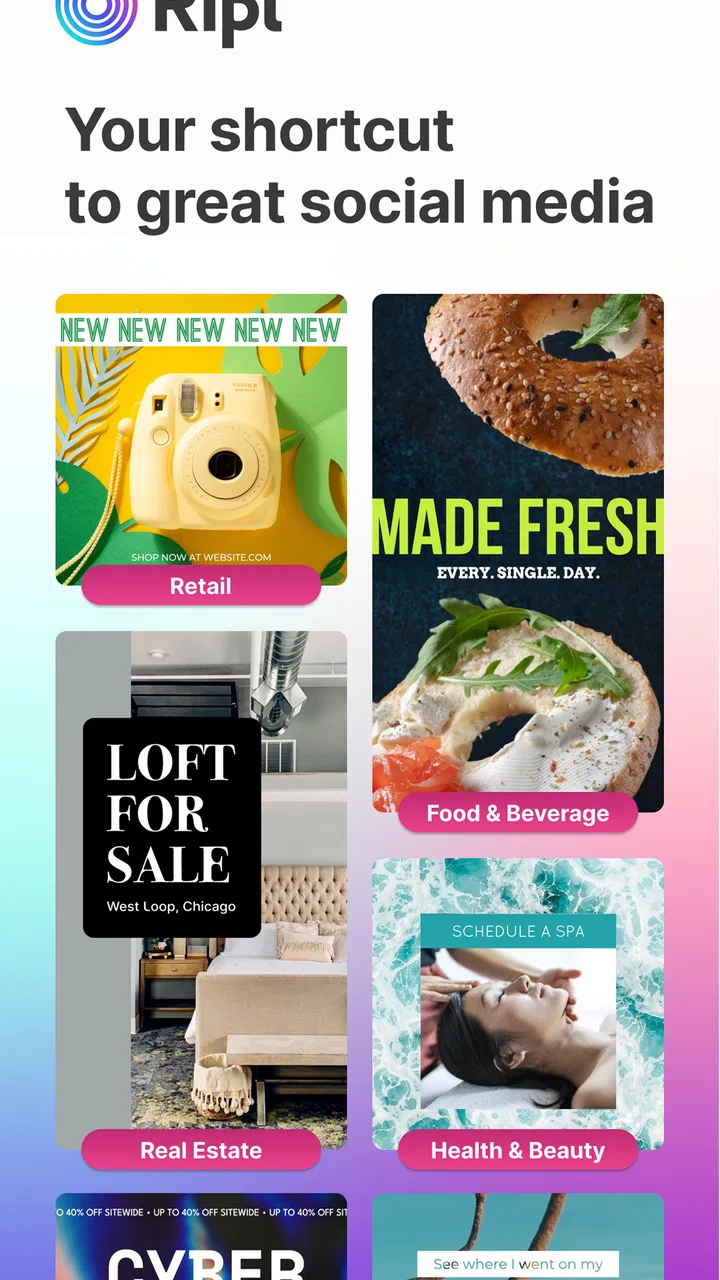
That distinction matters. I can open it with a specific task in mind, choose a suitable format, add my message, and work toward something that looks ready for a social feed, story, flyer, video advertisement, promotional clip, or slideshow. The experience is aimed at reducing the blank-page problem. Instead of beginning with a completely empty canvas, I start from a structured idea and adjust it to fit my message.
The app is free to install and has reached over one million installs, with a 4.4 average from around fourteen thousand ratings. Those figures suggest that Ripl has found a practical audience among small businesses, independent sellers, event organizers, and everyday users who want more than a plain photo with text but do not want to become full-time designers.
You May Also Like

 Blood Strike: 2.5 Anniversary
Blood Strike’s Loadouts Turn Every Drop Into a Tactical Gamble
A close look at Blood Strike’s custom loadouts: how fast access to signature weapons reshapes its battle royale rhythm, rewards preparation, and narrows the gap between fights.

 Pandora - Music & Podcasts
Pandora’s Music Is Easy to Start, but Harder to Recover
Pandora’s strength is its low-effort path from a seed to a station. Its weak spot is how much confidence it asks you to place in connection, setup, and quiet recovery.

 8 Ball Pool
 Is Built on Rivalries, Rematches, and Routine
A close look at the rivalries, rematches, shared routines, and unanswered safety questions that turn a quick pool match into a persistent mobile community.

 Samsung Music
’s Quiet Strength Is Playing What You Already Own
Its reach comes less from spectacle than from dependable access to a personal library. That simplicity is both the app’s strongest retention engine and its ceiling.

 AccuWeather: Weather Radar
AccuWeather Review: A Quick, Clear Forecast for Everyday Decisions
For everyday plans, the best forecast is the one you can understand quickly. AccuWeather makes rain timing, radar, and local conditions easy to act on, with a few trade-offs.

 Hill Climb Racing
Why Hill Climb Racing Still Turns Crashes Into One More Run
A tiny car, a bumpy hill and one more upgrade: Hill Climb Racing keeps resurfacing because its simple chaos makes every near-miss feel personal.
More From Our News Desk



What using Ripl feels like in everyday work
I find the everyday appeal of Ripl is less about making each post look spectacular and more about making routine announcements easier to finish. A useful way to judge it is to try one real message from start to finish, then ask whether its guided approach saves enough effort to justify using it again. That practical test also clarifies when a more open-ended design tool would suit me better.
A quick route from idea to publishable content
My favorite part of the workflow is how directly it addresses a common situation: I have an announcement to make, but I do not have the time or design confidence to build a visual from scratch. A weekend sale, a new service, a class reminder, a menu update, or a local event can all benefit from a more deliberate presentation than a simple text post.
Ripl makes sense in that moment because the creative decision is narrowed. I am not forced to decide every spacing value, animation detail, or visual relationship before seeing a result. I can focus first on the message, the image, and the action I want viewers to take. That makes it especially approachable for someone who normally creates posts directly inside a social network.
A realistic example would be a small café owner who notices on a Thursday afternoon that a popular seasonal drink is available for the weekend. Rather than spending the evening learning a complex editor, the owner can prepare a short promotional visual, include the product image and key wording, and adapt the result for a story or feed post. The value is not artistic originality; it is getting a coherent announcement out while it is still timely.
I also found this kind of guided workflow useful for repeated communication. When a business posts several times a week, speed and consistency can matter more than producing a completely new visual language every time. Using related layouts and keeping the wording focused can make a page feel more organized, even when the person creating it has no formal design training.
Where the formats are genuinely useful
The range of intended outputs gives the app a broader role than a simple poster maker. Social posts and stories are the obvious starting points, but flyers, promotional videos, advertisements, and slideshows cover different communication needs. I would use a story format for a short, immediate reminder, a flyer for something people may save or print, and a slideshow when several images need to explain an offer or event.
That flexibility is valuable because the same message often needs to appear in more than one place. A single announcement may begin as a feed post, become a story, and later be reused as part of a visual presentation. Creating each version manually in separate tools can introduce inconsistent wording, cropping, and branding. Ripl is appealing when I want one central idea to guide several related pieces of content.
There is also a useful distinction between making something attractive and making something understandable. A template can encourage me to keep the headline short, place the important detail where it can be noticed, and avoid filling every available space with text. In my experience, that restraint is one of the app’s quiet strengths. It helps users who know what they want to announce but are less certain about how much information a visual can carry.
Three habits that improve the results
The first habit I recommend is writing the message before choosing the design. It is tempting to browse visual styles and then force a long paragraph into a layout that was never meant to hold it. I get better results when I decide on one main point, one supporting detail, and one clear next step before opening the editor.
The second is to prepare images with the final format in mind. A photograph that works well in a wide flyer may crop awkwardly in a vertical story. I check where the important subject sits and avoid using an image whose main detail will be hidden by text or framing. This is a small step, but it prevents the common disappointment of finishing a design and discovering that the best part of the photo is missing.
The third is to treat motion as emphasis rather than decoration. Promotional videos and slideshows can attract attention, but movement does not automatically improve a message. I would use animated treatment for a launch, reminder, or short offer, while keeping a more restrained visual for information that people need to read carefully. If every element competes for attention, the result feels busy instead of energetic.
Useful for non-designers, but not a replacement for a full editor
Ripl’s strongest audience is someone who needs a professional-looking starting point and prefers guided choices. A local service provider, tutor, market seller, club organizer, or independent creator can benefit from that balance. The app removes much of the technical friction without demanding that the user understand advanced design terminology.
However, I would not choose it for a project that depends on precise art direction. If I needed detailed layer control, exact typography adjustments, complex image retouching, or a highly distinctive brand system, I would reach for a more specialized design application. Those tools generally take longer to learn, but they also give me more ownership over every visual decision.
This is the central trade-off: Ripl can help me produce something coherent quickly, but the same structure that makes it approachable can make the result feel familiar. If a campaign needs a one-of-a-kind visual identity, a template-centered workflow may be too limiting. For routine promotional communication, that limitation is often acceptable; for a major brand launch, it may be decisive.
The friction I would want new users to understand
The free entry point is helpful, but the app includes in-app purchases ranging from $9.99 to $299.99 per item. That is an important consideration before building a regular workflow around it. I would begin with the free experience, make a few actual posts, and decide whether the available tools justify spending money for my particular use rather than assuming every useful option will be included at no cost.
The wide span in purchase pricing also means different users may encounter very different value calculations. Someone preparing an occasional birthday announcement has a different threshold from a business producing promotional material every week. I would be especially careful to evaluate the app based on the exact formats and creative controls I need, not simply on the appeal of having many templates available.
Another limitation is the possibility of visual sameness. A template can solve layout problems, but it can also lead several businesses to communicate in similar ways. I try to make the result more personal through consistent wording, recognizable imagery, and a restrained color approach instead of changing the design randomly from one post to the next. That does not turn a template into custom branding, but it can make the finished work feel less generic.
There is also a practical learning curve, even though the app is approachable. The first result is not always the best result. I usually need to review text size, image cropping, contrast, and the order in which information appears. A design that looks fine while editing may be harder to understand when viewed quickly on a phone. Taking a moment to preview it as a viewer, rather than as its creator, makes a noticeable difference.
How it compares with familiar alternatives
Compared with designing directly inside a social platform, Ripl offers a more deliberate visual workflow. Social apps are convenient for immediate posting, but their creative tools are often tied closely to the moment of publication. Ripl is better suited to preparing a message with a little more structure before sharing it.
Compared with a full design suite, Ripl is faster to approach and less intimidating. I do not need to spend as much time constructing a layout from an empty workspace. The cost of that convenience is control: a professional editor will usually be better for custom grids, detailed typography, carefully managed brand elements, and complex compositions.
Compared with a simple photo editor, Ripl is more focused on communication packages rather than isolated image adjustments. I would not open it merely to correct lighting or remove a small distraction from a photograph. I would open it when the image needs to become part of a promotional message with a defined presentation.
That makes the app a middle option. It is more purposeful than a quick social post, but less open-ended than advanced design software. For many small promotional jobs, that middle ground is exactly what makes it useful. For artistic projects or highly controlled campaigns, I would choose the more specialized alternative.
Who should use it, and who should skip it
I recommend Ripl to people who regularly need social content but do not want to design every element themselves. It is particularly suitable for small businesses, independent professionals, community groups, and sellers who need to turn an offer or announcement into a visual quickly. It can also help a beginner develop better habits around hierarchy, concise copy, and matching a format to a communication goal.
I would be more cautious if your main priority is complete originality. A person who enjoys building designs from the ground up may find the guided approach restrictive. Likewise, someone who needs advanced control over every layer, export decision, or brand detail may outgrow the workflow quickly.
The age rating is Teen, and the app runs on devices using Android 8.0 or later. That makes compatibility worth checking before planning a shared workflow for an older phone or tablet. The current version is 4.0.1004, so I would also keep the app updated when possible, particularly if I depend on it for regular promotional work.
My verdict after weighing speed against control
Ripl: Social Media Marketing succeeds because it understands a very ordinary creative problem: I often need a visual message before I have the time, skill, or energy to become a designer. Its guided approach, range of promotional formats, and emphasis on quick communication make it a practical choice for recurring social content.
Its weaknesses are just as clear. The results can feel template-driven, advanced creative control is not its main purpose, and the in-app purchase range deserves careful consideration. I would not make it the center of a demanding brand campaign without testing whether its style and controls are sufficient.
For a small business owner preparing a weekend offer, a freelancer announcing availability, or an organizer promoting an event, I think it is worth trying because the free starting point lets you judge the workflow in a real situation. My advice is to begin with one concrete project, keep the copy short, compare the result with a direct social post, and only then decide whether the extra design structure earns a permanent place in your routine.
Overall, I see Ripl as a time-saving promotional tool rather than a complete design replacement. If your goal is to publish clear, attractive content without wrestling with a blank canvas, it can be a good fit. If your goal is total visual freedom, I would skip it in favor of a deeper editor. Its best quality is not that it makes every design exceptional; it is that it helps ordinary announcements become presentable, consistent, and ready to share.
FAQs for Ripl: Social Media Marketing
01What is Ripl: Social Media Marketing used for?
Ripl is a social media content creation and marketing app designed mainly for small businesses, entrepreneurs, freelancers, and creators. It helps you make branded posts, promotional videos, stories, and advertisements using templates, text, photos, logos, music, and animations. You can also use it to plan or publish content across supported social networks, making it easier to maintain a consistent online presence without advanced design experience.
02Is Ripl suitable for beginners without graphic design or marketing experience?
Yes. Ripl is built around ready-made templates and guided editing tools, so beginners can create professional-looking social media content relatively quickly. During testing, the workflow felt more approachable than using a full desktop design suite because most elements can be customized directly from the template. However, users who want complete control over layouts, typography, or advanced video editing may find the available options somewhat limited.
03Which social media platforms can I use with Ripl?
Ripl is intended to help businesses create and share content on popular social media channels, but the exact publishing and scheduling options can depend on the current app version, your device, and the social accounts you connect. Before downloading, check the latest store description and in-app integrations for platforms such as Facebook, Instagram, and other supported networks. Some features may require account authorization or a compatible professional profile.
04Is Ripl free to download, and does it require a subscription?
Ripl can generally be downloaded for free, but many of its more advanced tools may be available only through a paid plan or trial. Premium access can include additional templates, branding options, stock assets, analytics, scheduling features, or removal of certain restrictions. Before starting a trial, review the subscription price, renewal terms, and cancellation process in the Google Play Store or Apple App Store to avoid unexpected charges.
05Can I create branded content with my own logo, colors, and business information?
Yes. One of Ripl’s main advantages is its focus on consistent business branding. Depending on the plan and available features, you can add a logo, business details, preferred colors, and other visual elements to templates and promotional designs. This is useful when creating repeated posts for products, services, events, or special offers. Nevertheless, it is worth checking premium limitations, since some branding controls may not be included in the free version.
Pros
- Quickly turns photos and videos into polished social posts.
- Includes templates designed for promotions
- announcements
- and events.
- Supports branded content with logos
- colors
- and custom text.
- Scheduling tools help maintain a more consistent posting routine.
- Useful analytics provide insight into post performance and engagement.
Cons
- Many attractive templates and features require a paid subscription.
- Some designs can feel repetitive if used frequently.
- Advanced editing options are limited compared with dedicated design apps.
- Export and sharing workflows may vary across social platforms.
- The interface can feel crowded for users managing multiple brands.

Ripl: Social Media Marketing
Gallery